Service & Operation Manuals
Equipment operating instructions, maintenance schedules, and service guides.


Translate the PDF sections you need, then compare technical terms, parameter tables, and notes with the original. Choose from 153 languages and review an available trial before translating more pages.
Side-by-side preview • 153 languages • Original layout as reference
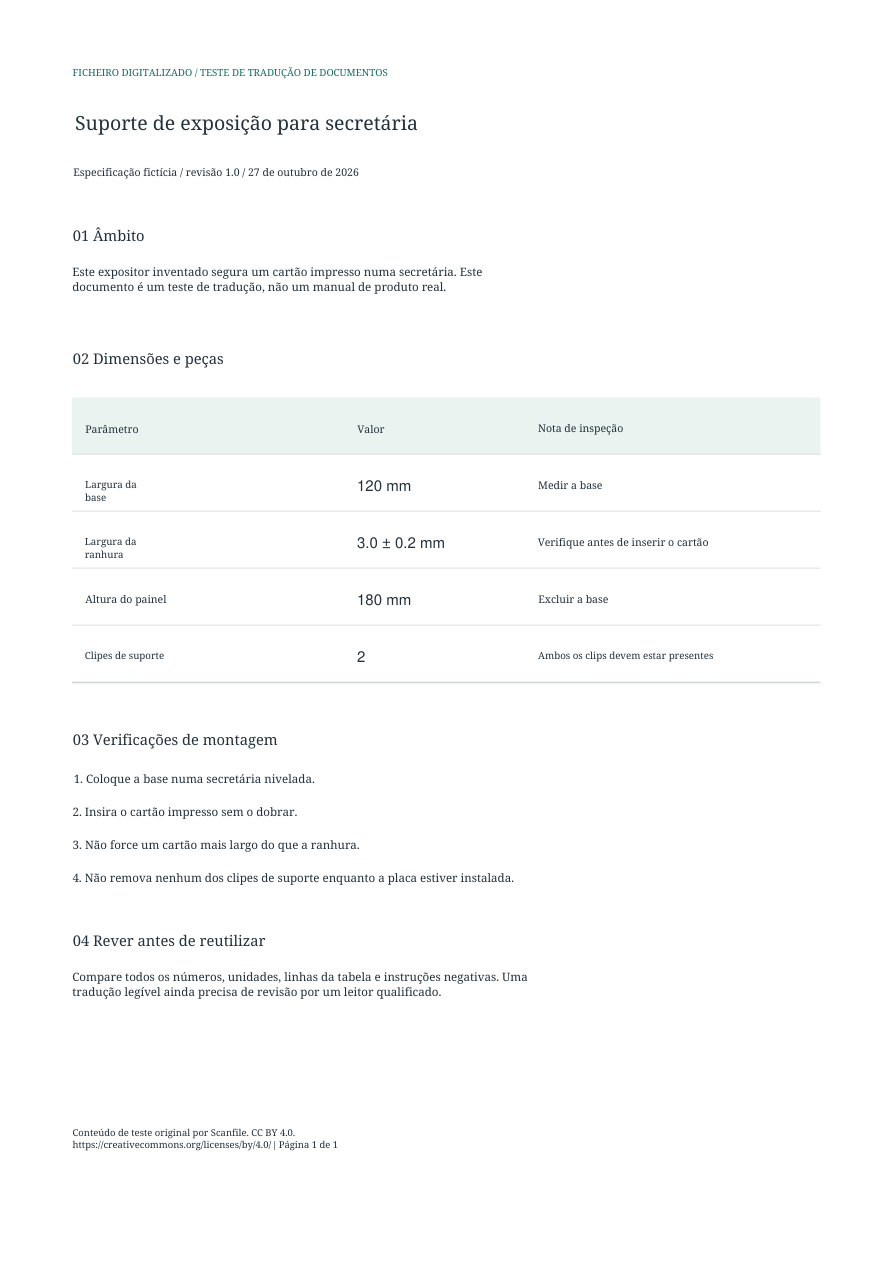
Compare a real technical PDF translation and its review notesUse this original English specification to check a document translator before uploading your own manual. The fictional desktop display stand includes a parameter table, a tolerance and two negative instructions. Download the source and the actual Portuguese output below, including the issues we found. You can also use the same source and checklist to review another tool.
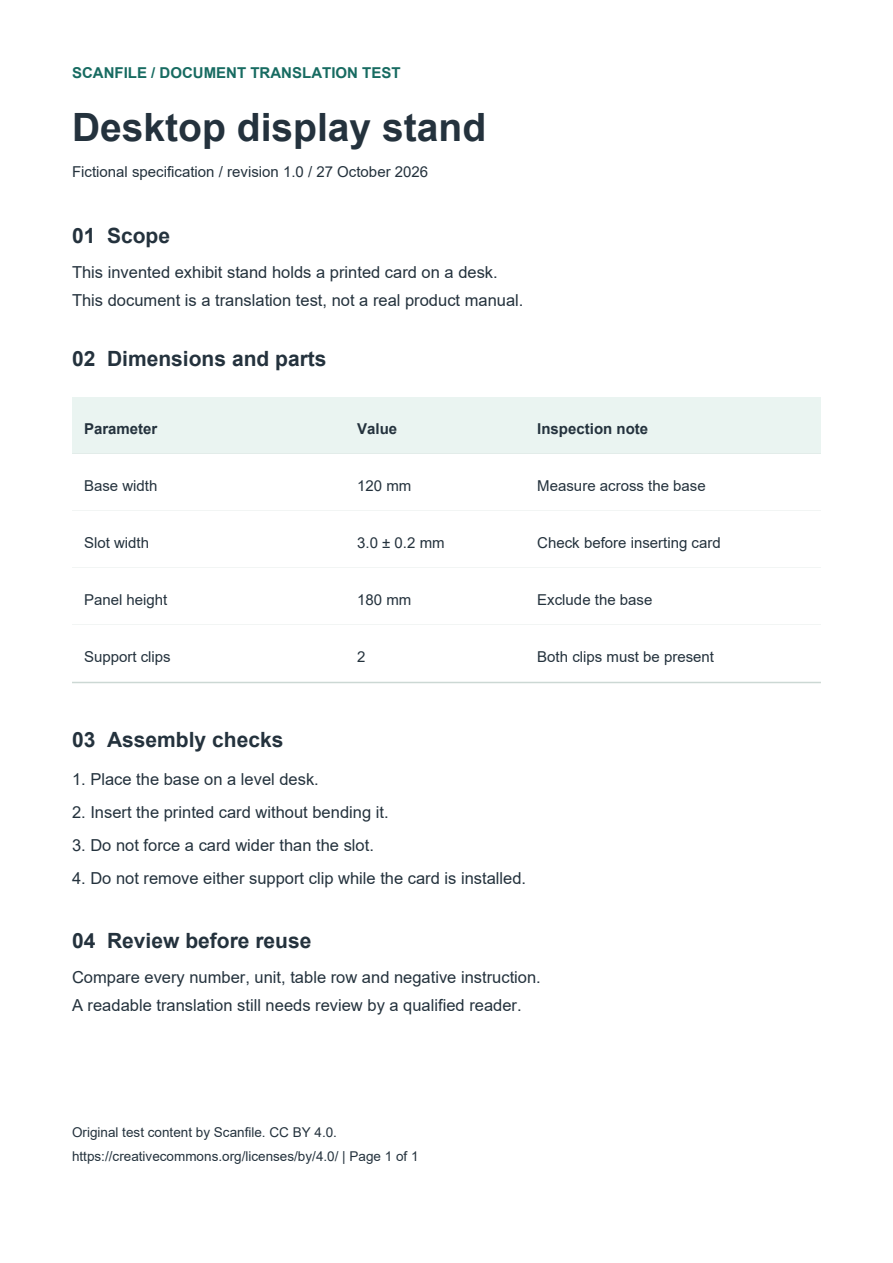
Reviewed October 27, 2026. This file came from Scanfile’s live workflow using test credits and has not been manually corrected. It is a single example, not a translation-quality benchmark.
Want to practice side-by-side review? Open the comparison reader and load its separate English-to-Spanish datasheet example, or choose the display-stand files above yourself. The comparison runs locally; no PDF is uploaded for this step.
This review describes one actual output and its known issues; it is not engineering validation or certified translation. It does not test scanned pages, complex diagrams or long manuals. Review terminology and instructions with a qualified reader before reuse. Original test content and checklist: CC BY 4.0.
Try a page from your technical PDFDrag and drop or choose a file. No account required.
Confirm the document language, then choose your translation language.
If a free trial is available, compare the translated pages with the original.
Choose the next pages, check the price and pay to continue.
Review original and translated pages side by side so you can check the meaning, terminology, and document structure in context.
Translate the PDF documents your engineering and purchasing teams work with every day.
Equipment operating instructions, maintenance schedules, and service guides.
Technical specifications and material parameters for comparing products and suppliers.
Requests for quotation and supply-chain commercial agreements in PDF.
Factory safety procedures and ISO/ASTM industrial standards for multilingual reference.
Scanfile provides a layout-aware translation and lets you compare the translated pages with the source. Results depend on the original document, so review the available preview before continuing.
PDF files follow a temporary three-day access policy, with access renewed by qualifying translation activity. Signing in saves the translation record but does not extend the underlying file's availability. Download your translation before it expires.
Choose from 153 translation languages: Afrikaans, Albanian, Amharic, Modern Standard Arabic, Armenian, Assamese, Aymara, Azerbaijani, Bambara, Basque, Belarusian, Bengali, Bhojpuri, Bosnian, Bulgarian, Burmese, Catalan, Cebuano, Chinese (Simplified), Chinese (Traditional), Corsican, Croatian, Czech, Danish, Dhivehi, Dogri, Dutch, English (United States), Esperanto, Estonian, Ewe, Filipino, Finnish, French, Frisian, Galician, Georgian, German, Greek, Guarani, Gujarati, Haitian Creole, Hausa, Hawaiian, Hebrew, Hindi, Hmong, Hungarian, Icelandic, Igbo, Ilocano, Indonesian, Irish, Italian, Japanese, Javanese, Kannada, Kazakh, Khmer, Kinyarwanda, Korean, Krio, Kurdish (Kurmanji), Kyrgyz, Lao, Latvian, Lingala, Lithuanian, Luganda, Luxembourgish, Macedonian, Maithili, Malagasy, Malay, Malayalam, Maltese, Maori, Marathi, Manipuri (Meitei), Mizo, Mongolian, Nepali, Norwegian Bokmål, Nyanja (Chichewa), Odia, Oromo, Pashto, Persian, Polish, Portuguese (Portugal), Punjabi, Quechua, Romanian, Russian, Samoan, Sanskrit, Northern Sotho (Sepedi), Serbian (Latin), Southern Sotho (Sesotho), Shona, Sindhi, Sinhala, Slovak, Slovenian, Somali, Spanish (Spain), Sundanese, Swahili, Swedish, Tajik, Tamil, Tatar, Telugu, Thai, Tigrinya, Tsonga, Turkish, Turkmen, Twi (Akan), Ukrainian, Urdu, Uyghur, Uzbek, Vietnamese, Welsh, Xhosa, Yoruba, Zulu, Portuguese (Brazil), Spanish (Mexico), Spanish (Argentina), Spanish (Latin America), Chinese (Traditional, Hong Kong), English (United Kingdom), English (Australia), English (India), French (Canada), French (Belgium), French (Switzerland), German (Austria), German (Switzerland), Dutch (Belgium / Flemish), Arabic (Egypt), Arabic (Gulf), Arabic (Morocco), Arabic (Levant), Norwegian Nynorsk, Serbian (Cyrillic), Kurdish (Sorani), Latin, Scottish Gaelic, Yiddish, and Cantonese. Select your source and target languages after uploading your PDF.
A service manual, supplier datasheet, and RFQ need different review steps. Start with the relevant PDF pages and use the original as the reference for technical decisions.
Use the contents to locate the procedure or maintenance chapter, then confirm its actual PDF page positions. Include the warnings, prerequisites, and referenced notes around the procedure so that instructions retain their context.
Select the parameter table together with its test conditions, tolerance notes, and legend. A value without its unit, operating conditions, or footnote can mean something different.
Translate the requirements and the pages that define quantities, materials, delivery terms, or exceptions. Check product identifiers and part numbers against the source before comparing suppliers.
Compare repeated component names across sections. Check model names, part numbers, abbreviations, and references to other sections against the original.
Compare decimal separators, signs, ranges, powers, and unit symbols. Do not assume translation also performs a unit conversion or validates a technical specification.
Check that each translated label still refers to the intended row, column, figure, or footnote. Inspect small diagram labels and embedded image text separately.
Review negation, prerequisites, sequence, and safety warnings in context. Use a qualified reviewer before relying on a translation for operation, safety, compliance, or contractual decisions.
A parameter may depend on a table heading, test conditions or a footnote on another page. Include those pages when selecting an excerpt. Scanfile uploads the entire PDF you choose before page selection; if you prefer to send a smaller file, extract the pages locally, download and inspect the new PDF, then decide whether to upload it. Page numbers in the new file may change. Extraction is not secure redaction, and annotations or hidden content may remain.
| Source parameter | Source value | Review alongside the translation |
|---|---|---|
| Flow rate | 120 L/min | Value, unit symbol, and the matching table row |
| Working pressure | 16 bar | Operating condition versus a maximum or test pressure |
| Motor power | 7.5 kW | Decimal separator, unit, and the associated model |
This page accepts PDF files up to 300 MiB and uses the same page-selection workflow as the PDF translator. Eligible files can try the first three pages; additional pages use the credit amount shown before confirmation. Dense tables, formulas, drawings, scans, and unusual fonts need particular review. Translation does not certify a document, validate engineering values, or guarantee identical formatting.
Yes. Select its PDF page range after upload, including any relevant warnings and notes. The document’s printed chapter numbering can differ from the PDF page positions.
Do not treat translation as technical validation. Compare values, unit symbols, tolerances, and conditions with the original. Arrange engineering review where accuracy affects a decision.
A diagram may be an embedded image rather than selectable text. Do not assume every label will be translated or editable. Inspect those areas in the preview and finished result.
Scanfile provides AI translation for reading and review. It does not provide a certified translation or engineering approval. Check any certification or professional review requirements before submitting the result.
Choose individual pages, page ranges, or the complete PDF. Review the required credits before starting your paid translation.
Upload a technical PDF, choose a language, and continue to your translation workspace.
Upload PDF Now