

How to translate a research paper PDF and review it
Use a translation to navigate an unfamiliar language, then verify the original before relying on a finding. This guide covers page selection, tables, citations and keeping a translated reading copy with your research notes.
By Scanfile, a document translation service. Machine translation is a reading aid, not evidence that a finding is correct.
Translate a research paper PDF
Choose a PDF you are permitted to upload. The entire file is uploaded before you select pages. An eligible trial covers the first three file pages; review the displayed credits for other pages. Compare the result with the original.
How to translate a research paper PDF and review the result
A research paper is more than its abstract. Methods, uncertainty, figure captions and citations can change how a result should be understood. Use machine translation as a reading aid and keep the original available for review.
- Check the source and permissions. Record the authors, version and DOI or other source locator. Use a copy you are permitted to process, and consider your institution’s rules before uploading unpublished or confidential material.
- Inspect representative pages. Try selecting text in the abstract, a methods page and a results page. Scanned pages, figures with embedded words and unreliable text layers need extra attention. A mixed PDF may contain both selectable and image-only pages.
- Select enough context. Include the relevant method, result, figure or table caption, footnotes and limitations. For example, file positions 3-6,8 select five pages, not three. PDF file positions may differ from page numbers printed in a journal.
- Translate and inspect before extending. Choose the source and target languages and review the page selection and credit estimate. When eligible, the free PDF trial covers the first three pages of the file, not any three selected pages; later pages require the credits shown before confirmation.
- Compare the same passage in both files. Check column order, figure-to-caption links, table headings and notes, equations, units, decimal points, citation markers, negation and terms of uncertainty. Locate the corresponding original passage whenever the translation looks unclear.
Translate text inside a figure or chart
A paper can have selectable body text while a diagram, chart or screenshot contains words drawn into an image. A translated page may leave those labels in the original language. Check the figure itself, not just its caption or the extracted text. Scanfile’s scan examples do not establish that every embedded figure will be translated.
- Locate the figure and its caption in the original PDF. Zoom in and try selecting a label: if the label cannot be selected, it may be part of an image. Keep the full page and caption available for context.
- If you have permission to share it, capture a clear image of the figure with its labels and legend. On a computer, Google Translate’s Images tab can translate an uploaded image; choose the languages and compare the original and translated image. This sends the image to Google. Read Google’s image translation instructions.
- Review every axis, legend, unit and direction against the original. Small labels, symbols and surrounding context can be missed or mistranslated. Keep the image translation as a separate reading aid; this does not replace the figure in the PDF or make its text editable.
For an entire image-only page, use the scanned PDF workflow and compare the result with the original. A mixed page with selectable text and an embedded image is a different case; inspect the image labels separately. For important findings, consult a qualified reviewer.
Review an actual translation
We translated a fictional English research exercise into Portuguese. Compare 12 of 40 seedlings, eight days, “may reflect” and the statement that observation does not establish causation. Fonts and line breaks changed. This unedited result has no independent linguistic review and does not establish quality for real papers, equations or scans.
Fictional English originalActual Portuguese resultCompare PDFs locally
Inspect a two-column translation and its table
We created this one-page fictional reading exercise and translated it from English into Portuguese using Scanfile’s guest trial on November 15, 2026. The participants, results and citation are invented; this is not a research paper or scientific evidence.
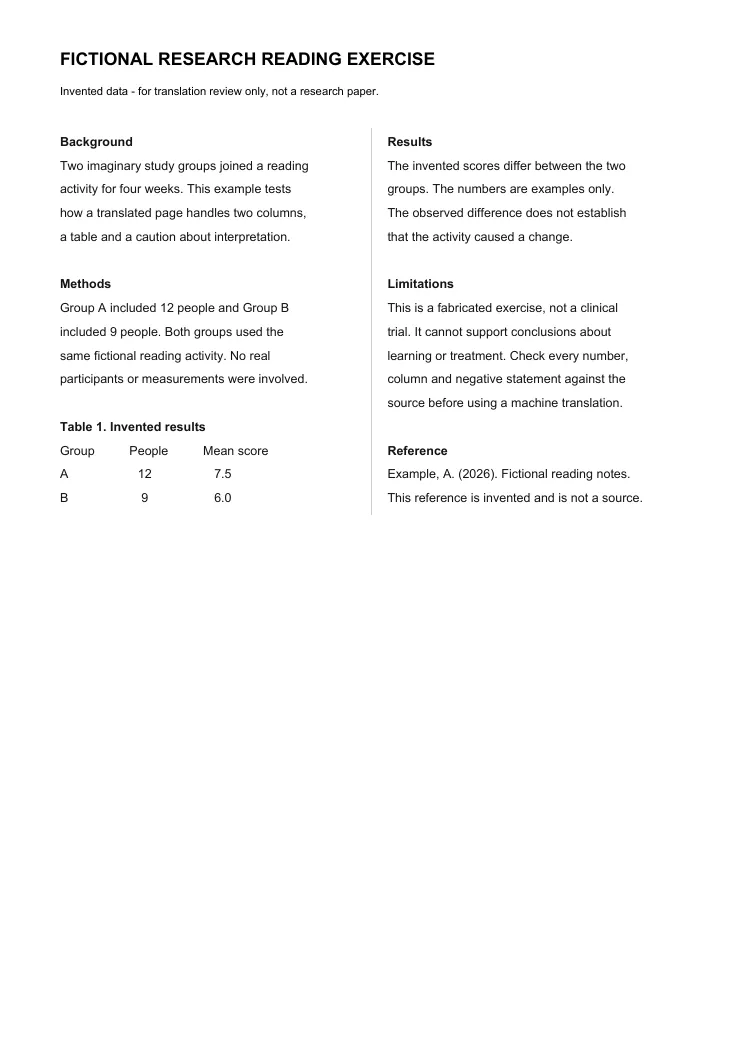
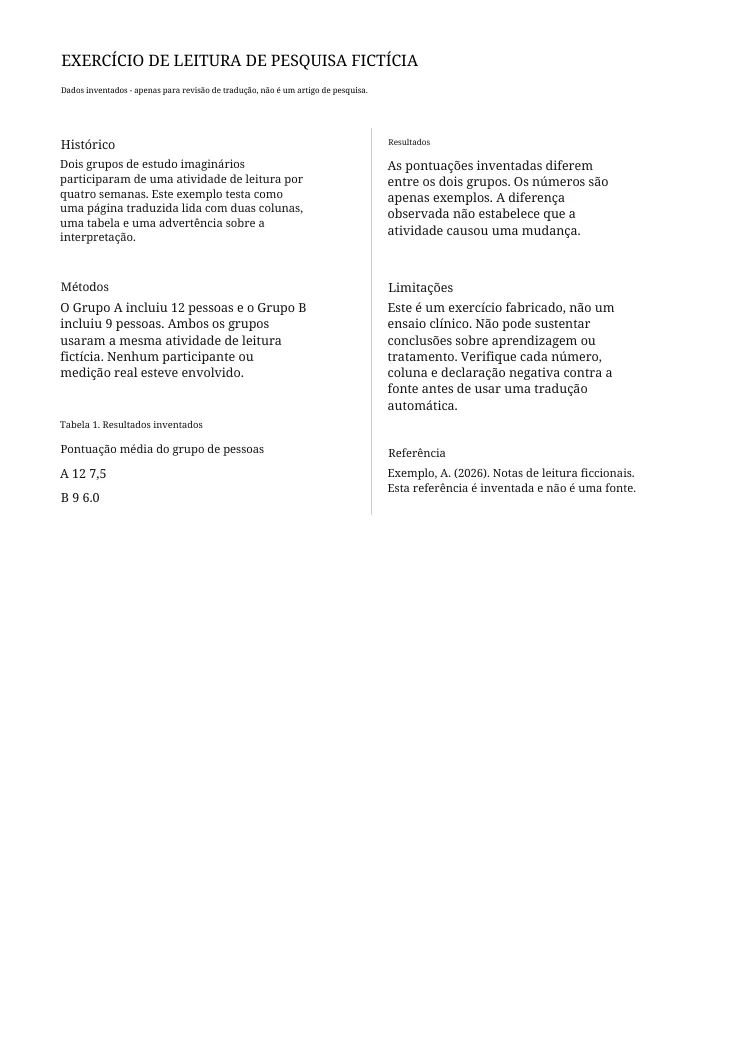
In this output, the body remains in two columns and the statement that the difference does not establish causation is retained. The table headings merge, its values are crowded, and 7.5 becomes 7,5 while 6.0 remains 6.0. Check each value against its original row and column. The output has not had independent Portuguese review; this single clean text-based exercise does not establish performance on actual papers, scans, equations or other layouts.
Download the fictional English PDFDownload the unedited Portuguese PDFCompare PDFs locally
Keep a review record
Use the blank worksheet to note the original locator, file and printed page numbers, passages needing review and unresolved questions. It is a plain text file you fill in locally; it does not examine your PDF or verify a translation.
Keep a translated PDF with its Zotero item
In desktop Zotero, locate the original attachment with Show File, then choose it here only if you are permitted to upload it. After downloading the translation, add it as a separate child attachment to the same bibliographic item and keep the original. Compare the matching file pages: a partial translation may start at a different page. Check institutional privacy rules and whether Zotero file syncing is enabled before adding a sensitive copy.
Scanfile is a separate website, not a Zotero plugin; moving and attaching files is manual. A selection-translation or full-document Zotero plugin may be more convenient if you need translation inside Zotero. Read the Zotero workflow and alternatives.
Download the research-paper review worksheetInspect an actual translated reading briefChoose a PDF
Before quoting or citing, verify the passage against the original source and follow your institution’s citation rules. The translation is not an independent source, a certified translation or a substitute for subject-matter review. The Google Translate documentation notes that text in scanned PDF images is not translated in its document output; other services and workflows differ.
How to translate an arXiv paper PDF
Have a paper on arXiv? Save the PDF to your device first. Scanfile accepts the PDF file; it does not fetch a paper from a pasted arXiv or DOI link.
- On the paper's arXiv abstract page, choose PDF and save the file. Note the title, authors and version so you can find the same original later.
- Choose the saved PDF in the upload area above, then select the source and target languages. Review the available sample before deciding whether to translate further pages.
- Compare important passages with the original. Check column order, mathematical notation, table labels, citation markers and any conclusions qualified by uncertainty.
- Keep the original paper and its identifier with your notes. Check the paper's license and your institution's rules before sharing a translation.
PDF layout and translation quality vary. Equations, references and figure text require review; a translated copy does not replace the original. Use the side-by-side PDF reader to inspect corresponding pages.
Compare an actual translated research-paper page
We selected page 9 of Kristin A. Briney’s 2024 open-access PLOS ONE paper, added an attribution page and translated the two-page file from English to Portuguese using Scanfile’s free trial. The download contains the source, the two unedited per-page translation files and attribution. The paper is licensed under CC BY 4.0; neither the author nor PLOS endorses Scanfile.
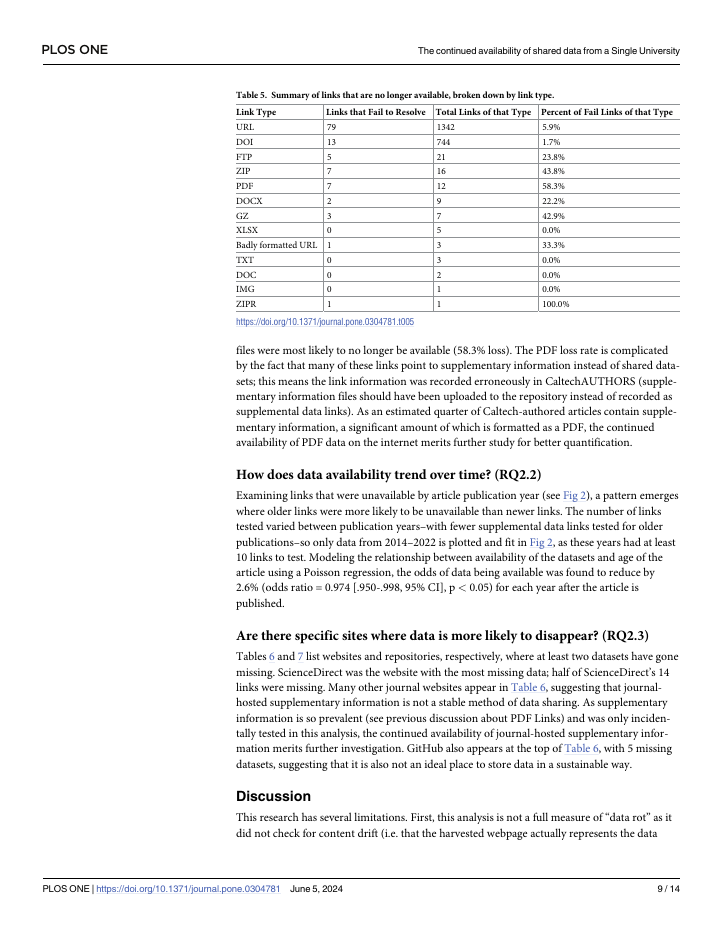
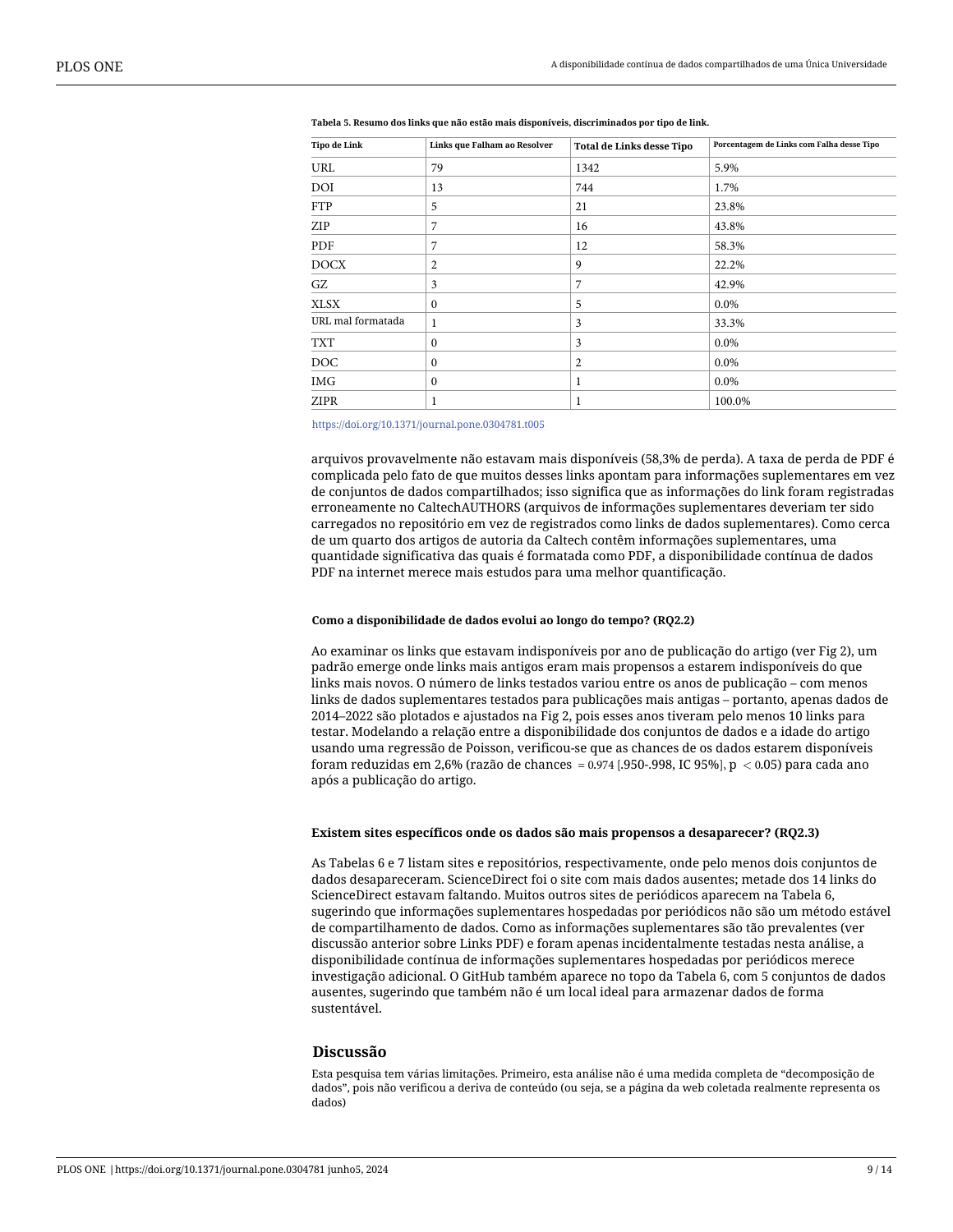
In our spot check, the URL and DOI rows retain their counts and percentages; compare the other cells and the surrounding discussion yourself. The layout changed, and the footer date appears as "junho5, 2024" without a space in the output. The excerpt starts and ends mid-paragraph, so consult the complete original for context. This machine translation has not received independent linguistic review and does not establish performance on other papers, scans or equations.
How to review equations in a translated PDF
When a paper contains mathematical equations, inspect the original and translated pages together. The research-paper example above does not test equations, and a readable layout does not establish that a formula or its explanation is correct.
- Match the page, equation number and surrounding paragraph. If translation changed the pagination, locate the equation in the original rather than assuming page numbers match.
- Compare signs, brackets, fractions, subscripts, superscripts, units and variable names against the original. Check that symbols and numbers have not disappeared, moved or changed meaning.
- Read the definition of each variable and the sentence that refers to the equation. Check figure labels and captions too; text inside an image may require separate review.
For a formula-heavy paper, PDFMathTranslate is a separate open-source project designed for scientific PDFs. It requires its own setup; provider privacy and costs depend on the configuration. We have not compared its output with Scanfile on this paper. Review either result against the source and consult a subject expert before relying on it.
Open the local side-by-side PDF reader · See the research-paper example and its limits
A practical check for tables and citations
For each result you plan to use, write down the original file page and table or figure number. Compare the row and column headings, sample size, units, percentages, footnotes and qualifying language in context. A table can look intact while a sign, decimal or label is wrong. If a caption refers to another page, review that page too.
Keep the paper’s original bibliographic item and cite the original publication, following your institution’s rules. A translated PDF can help you locate a passage; it does not replace the original text or an expert assessment of the research.
Open the local side-by-side PDF reader · Translate an authorized PDF